使用 svg-sprite-loader 引入 .svg 文件
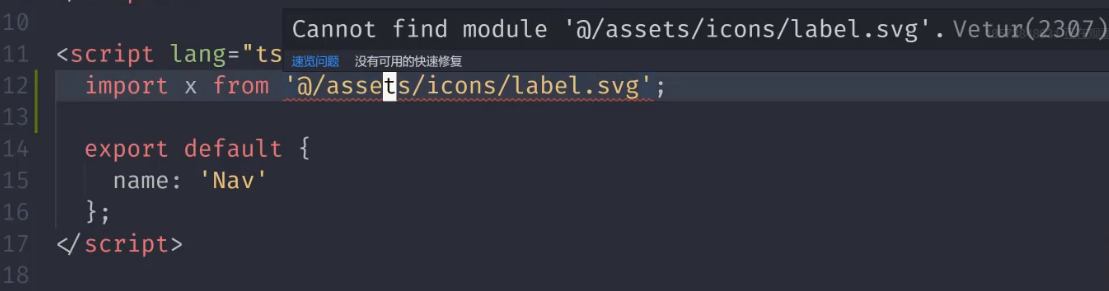
TypeScript 中如果直接引入 .svg 文件将报错: cannot find module “xxx.svg”
搜索资料,发现需要在 Vue 项目的 shims-vue.d.ts 文件中添加如下配置:
| declare module "*.svg" {
const content: any;
export default content;
}
|
但是随后发现引入进来的 .svg 无法显示图标,控制台打印引入的 .svg 文件得到的并不是图标文件,而是一个字符串形式的路径。
这个路径应该可以直接作为 ![]() 标签的
标签的 src 传入,这样引入的就不是图标而是图片了。但是这种方法使得随后修改 .svg 文件源代码更加麻烦,同时图片相对图标有所失真。

于是我查阅相关资料,希望可以直接解析出 .svg 源文件。发现缺少 svg-loader 导致webpack无法解析出 .svg 文件。目前有一个较好用的插件: svg-sprite-loader 可以解决这个问题。
| yarn add svg-sprite-loader -D
|
官方给出的 webpage.config 配置如下:
| {
test: /\.svg$/,
loader: 'svg-sprite-loader'
}
|
配置插件:
| {
plugins: [
new SpriteLoaderPlugin({
plainSprite: true,
spriteAttrs: {
id: 'my-custom-sprite-id'
}
})
]
}
|
但是新的问题是 Vue-CLI 并不提供 Webpack.config.js 配置文件,创建的项目下只有一个 vue.config.js 。最后,我选择使用根据 Vue-CLI 的 链式操作 将以上代码翻译成 vue.config.js 接受的代码。修改源文件,例如:.svg 图标颜色也比较方便,直接改 vue.config.js 配置文件即可:
1
2
3
4
5
6
7
8
9
10
11
12
13
14
15
16
17
18
19
20
21
22
23
24
25
26
27
28
29
30
31
| const path = require('path');
module.exports = {
chainWebpack: config => {
const dir = path.resolve(__dirname, 'src/assets/icons');
config.module
.rule('svg-sprite')
.test(/\.svg$/)
.include.add(dir).end()
.use('svg-sprite-loader').loader('svg-sprite-loader')
.options({extract: false}).end();
config.plugin('svg-sprite').use(require('svg-sprite-loader/plugin'), [{plainSprite: true}]);
config.module.rule('svg').exclude.add(dir);
config
.plugin('html')
.tap(args => {
args[0].title = 'BitByBit'
return args
});
}
};
|
随后 <symbol> 标签被引入 <svg> ,此时便可正常使用 svg-symbol 了:
| import money from "@/assents/icons/money.svg";
console.log(money);
|
| <svg>
<use :xlink:href="#money"/>
</svg>
|

一次性引入所有 .svg 文件
每次引入图标文件都要写一遍 svg-symbol 的代码,十分冗余。经过大量查阅资料,最终我使用以下方法一次性引入了所有文件:
| let importAll = (requireContext: __WebpackModuleApi.RequireContext) => requireContext.keys().forEach(requireContext);
try {
importAll(require.context("../assets/icons", true, /\.svg$/));
} catch (error) {
console.log(error);
}
|
重大 bug:手机端微信浏览器中 window.prompt() 无效
PC 端和手机浏览器端开发测试完毕,当我准备最终发布时,竟发现一个重大 bug :微信手机端浏览器上无法添加标签。经过多端浏览器测试,发现也只有微信浏览器无法添加标签。这说明产生的 bug 不是代码的问题,原因可能是手机微信浏览器的数据库存储 或者 原生 api 不兼容手机微信浏览器。但是由于 Statistics 保存功能可以正常使用,统计图和收支明细也都可以正常显示,问题肯定不是出在 localStorage 上。最终确定JavaScript 原生api 不兼容手机端微信浏览器。经过打断点,发现添加标签时以下代码未执行,这证明了我的推断:
| export class TagHelper extends Vue {
public createTag() {
const name = window.prompt("请输入自定义标签");
if (name) {
this.$store.commit("createTag", name);
} else {
window.alert("fuck 标签名不能为空");
}
if (this.$store.state.createTagError) {
window.alert(map[this.$store.state.createTagError.message] || "未知错误");
}
}
}
|
手机端微信浏览器添加标签时,页面跳出待提交提示框,但是并没有被阻塞直接弹出 "fuck 标签名不能为空" ,这说明微信不认识 window.prompt(); ,它拿到的 name 值为 undefined
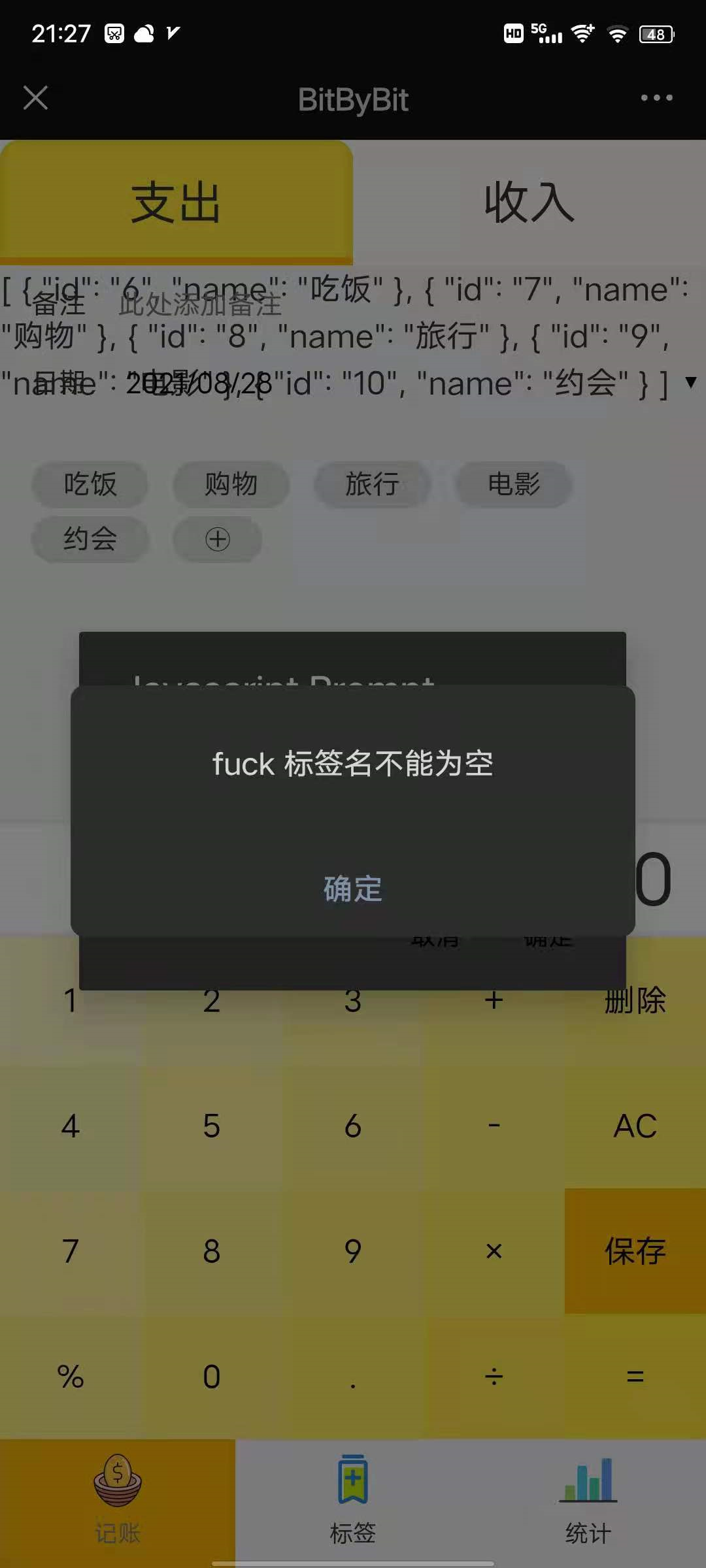
为此,我专门自己封装了 MyPrompt.vue 组件解决了这个 bug。
Vue 实现输入弹框
主要使用 v-if 来实现输入弹框。
1
2
3
4
5
6
7
8
9
10
11
12
13
14
15
16
17
18
19
20
| <template>
<div>
<div class="mask" v-if="showModal" @click="showModal=false"></div>
<button @click="showModal=true" class="add">添加</button>
<div class="pop" v-if="showModal">
<div class="prompt">
<div>请输入新增标签名:</div>
<div>
<input
type="text"
placeholder="此处输入标签名"
/>
</div>
<div>
<button @click="showModal=false">提交</button>
</div>
</div>
</div>
</div>
</template>
|
| <script lang="ts">
import Vue from "vue";
import {Component, Prop} from "vue-property-decorator";
@Component
export default class MyPrompt extends Vue {
showModal = false;
}
</script>
|
实现新增标签功能
应该可以直接在 MyPrompt 上完成添加标签操作,测试过的确没有问题,控制台并没有报警告。但本项目还是选择:按钮在父组件 Label 和 Tags ,弹框是子组件 MyPrompt ,添加标签使用父子组件传值来实现。
父组件:
| <template>
<div>
<MyPrompt
:newName="newName"
@update:newName="addNewName"
@submit:newName="createTag"
/>
</div>
</template>
|
1
2
3
4
5
6
7
8
9
10
11
12
13
14
15
16
17
18
19
20
21
22
| <script lang="ts">
import Vue from "vue";
import {Component} from "vue-property-decorator";
@Component
export default class Tags extends Vue {
newName = "";
addNewName(value: string) {
this.newName = value;
}
createTag() {
if (this.newName) {
this.$store.commit("createTag", this.newName);
this.newName = "";
} else {
window.alert("标签名不能为空");
}
}
}
</script>
|
子组件:
1
2
3
4
5
6
7
8
9
10
11
12
13
14
15
16
17
18
19
20
21
22
23
24
25
26
| <template>
<div>
<div class="mask" v-if="showModal" @click="showModal=false"></div>
<button @click="showModal=true" class="add">添加</button>
<div class="pop" v-if="showModal">
<div class="prompt">
<div>请输入新增标签名:</div>
<div>
<input
type="text"
:newName="newName"
placeholder="此处输入标签名"
@input="onAddNewName($event.target.value)"
/>
</div>
<div>
<button
@click="showModal=false;onSubmit()"
class="btn"
>提交
</button>
</div>
</div>
</div>
</div>
</template>
|
1
2
3
4
5
6
7
8
9
10
11
12
13
14
15
16
17
18
19
| <script lang="ts">
import Vue from "vue";
import {Component, Prop} from "vue-property-decorator";
@Component
export default class MyPrompt extends Vue {
showModal = false;
@Prop({default: ""})
readonly newName!: string;
onAddNewName(value:string){
this.$emit("update:newName",value);
}
onSubmit(){
this.$emit("submit:newName");
}
}
</script>
|